SketchUp vs SketchUp Pro: what Free, Go, Pro and Studio include
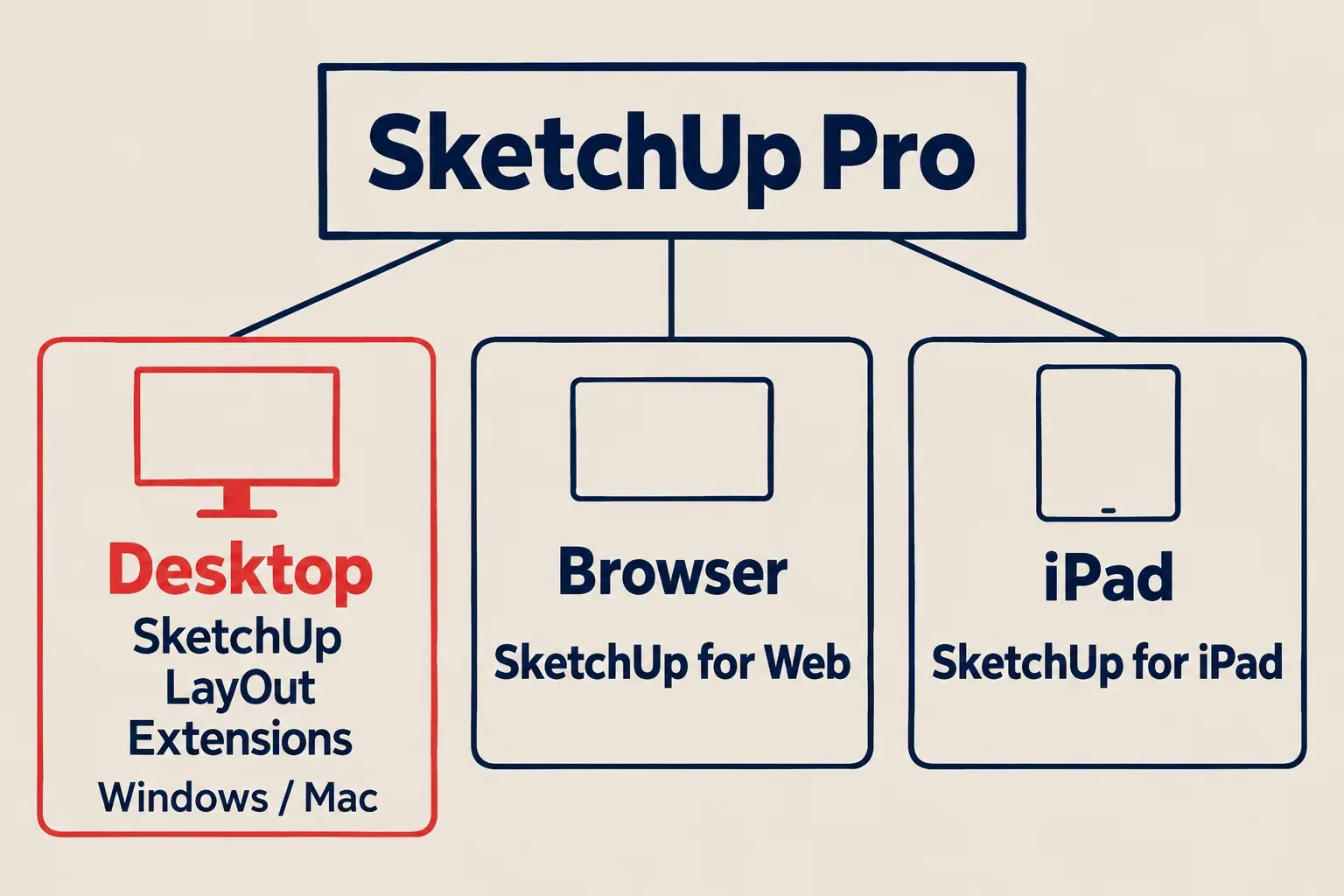
SketchUp is the family name; SketchUp Pro is a plan. Free runs in a browser for personal, non-commercial use, Go is the paid plan for browser and iPad, Pro adds the desktop app for Windows and Mac with LayOut and extensions, and Studio adds V-Ray, point clouds and Revit import on Windows only.
Choose SketchUp Pro if you need desktop modeling, LayOut drawing sets or desktop extensions. SketchUp Free is the browser option for personal, non-commercial projects; Go is the paid option for web and iPad work. “SketchUp” names the product family and the desktop app, while “SketchUp Pro” names a subscription that includes that app. Studio adds a Windows-only bundle of V-Ray, point-cloud and Revit tools, but narrower Pro plans cover scans or Revit work without buying the whole Studio bundle.
Why the download says SketchUp rather than SketchUp Pro
The current desktop download is SketchUp 2027. Pro is the subscription attached to your Trimble ID, so you do not need to find a different installer labelled “Pro.” Both Pro and Studio include the desktop modeler.
The browser app is a different surface. Free and Go both use SketchUp for Web, while Go also includes SketchUp for iPad. Pro includes those paid web and iPad tools as well as the desktop app and LayOut. The distinction matters when following a tutorial: a desktop extension or LayOut step will not appear just because you open a Go model in a browser.
Older names explain some of the confusion. SketchUp Shop was replaced by Go, which added the iPad app to the former Shop offering. SketchUp Make appears among the older desktop releases; it is not today's free desktop edition. The free offering now described by Trimble is SketchUp Free in a browser.
Choose the plan for the file you need to deliver
Start with the output: a personal model, a DWG, a LayOut sheet, a model built around survey scans or a rendered image. The table translates Trimble's plan contents into those jobs. The specialty Pro plans are branches for particular work, so there is no reason to buy Studio just to get Scan Essentials.
| Your job | Plan to choose | Where it works |
|---|---|---|
| Open an SKP and model a personal, non-commercial project | Free | Browser |
| Do paid browser work, exchange DWG/DXF files or model on an iPad | Go | Browser and iPad |
| Use the desktop app, desktop extensions or LayOut drawing sets | Pro | Windows or Mac; web and iPad also included |
| Model around point-cloud survey data with Scan Essentials | Pro Scan | Windows for Scan Essentials |
| Import Revit files with the Revit Importer | Pro Advanced Workflows, or Studio | Windows for the importer |
| Get V-Ray as part of a SketchUp subscription bundle | Studio | Windows-only bundle |
For a room layout you will use yourself, Free can be enough. For a paid room model delivered as SKP or DWG, Go may cover the work. I would choose Pro when a LayOut sheet or a desktop extension is part of the deliverable, because either requirement rules out Go before the size or complexity of the model enters the decision.
Free versus Go: the browser, the license and the iPad
SketchUp Free is not licensed for commercial use. That is a purchase decision even if its modeling tools cover the geometry you want to draw. Planning your own garden shed and producing a shed model for a paying customer are different uses of the same shapes.
Free can open SKP models and includes 10 GB of Trimble Connect storage. Go adds paid web features, the iPad modeler and unlimited cloud storage. For file exchange, the useful dividing line is DWG and DXF import and export in the subscriber version of SketchUp for Web. Go also provides browser exports such as OBJ and FBX. You do not need Pro solely because a colleague asks for a DWG.

The Go subscription includes SketchUp for iPad; Free does not include paid access to that app. The iPad modeler requires iPadOS 18 or later. Go's web access is not an Android modeling app: Trimble recommends a keyboard and mouse for the web modeler, and directs Android users to Trimble Connect for accessing projects.
Keep the purchase channel in mind if you expect to move from Go to Pro. For Go bought through Apple's App Store, Trimble instructs you to cancel that subscription through Apple and then purchase Pro from SketchUp. Buying directly from Trimble uses its own plan-change process.
What makes Pro worth paying for
The decisive additions are the desktop modeler, LayOut and desktop extensions. Pro includes the paid web and iPad tools too, so moving to desktop does not mean abandoning a model you work on through those other surfaces.
- LayOut drawing sets. Insert a SketchUp model into a LayOut document and arrange its views with the rest of your sheet. LayOut can update its model reference when the SketchUp model changes, which is the useful distinction when a drawing set has to follow revisions.
- Extensions. The Extension Warehouse contains free and paid tools built for desktop SketchUp. Go does not run them in the browser. Pro provides the desktop platform; an individual paid extension still has its own purchase and compatibility requirements.
- Desktop file workflows. Trimble lists IFC, USDZ and glTF workflows under Pro and Studio. Choose the required file format before buying, and check whether you need import, export or both.
For basic edge-and-face modeling, “professional” is too vague a reason to upgrade. A group still separates geometry, and a component still repeats a part. The purchase earns its place when you need a particular app, extension or output that the browser plan lacks.

Scans, Revit and V-Ray need different decisions
Pro Scan adds Scan Essentials to Pro. That is the direct route for importing point clouds and modeling around surveyed conditions on Windows. Pro Advanced Workflows adds more: its documented bundle includes Scan Essentials, Revit Importer and Trimble Site Contractor. Pro Civil Contractor is the separate field-work offering for Siteworks workflows, not the default upgrade for ordinary desktop modeling.
For Revit import, I would choose Pro Advanced Workflows if V-Ray is not needed, because both its dedicated plan page and the pricing grid explicitly include the importer. Trimble's Revit overview also names Pro Scan, but the Pro Scan plan page and pricing grid do not include Revit Importer. Do not buy Pro Scan on the assumption that its scan tools also provide a Revit license.
The importer needs Windows and SketchUp 2023 or later. Its file support starts with Revit 2011 and ends at the newest Revit format supported by your importer version. New Revit formats can take weeks or months to reach the importer; “2011 or later” is not a promise that every new Revit release will open immediately. Check the incoming file's version before choosing this route.
Studio combines Pro with V-Ray, Scan Essentials, Revit Importer and Trimble Site Contractor. It is the bundle to consider when you need those visualization and data tools together. A need for scans alone points to Pro Scan; Revit without V-Ray points to Pro Advanced Workflows.
Match the plan to Windows or Mac
Pro is the straightforward choice for desktop SketchUp and LayOut on a Mac. The Studio subscription is sold for Windows only, and Scan Essentials and the Revit Importer have Windows restrictions. Buying Studio does not make those tools run on macOS.
Mac rendering has a separate purchase route. Trimble's V-Ray FAQ confirms that V-Ray can be bought directly from Chaos and discusses its use on Mac hardware. A Mac user can therefore consider Pro plus a separately licensed, compatible V-Ray version; check the renderer's supported SketchUp and macOS versions before buying it.
Check the desktop version as well as the subscription. SketchUp 2027 requires Windows 11 or an Apple silicon Mac. Trimble currently supports SketchUp 2025, 2026 and 2027; 2024 is no longer supported. Its downloads page points Windows 10 and Intel Mac users to SketchUp 2026.2, whose own operating-system requirements still apply. A Pro subscription and a compatible desktop installation are two separate requirements.
Use the Pro trial to settle the desktop question
The free trial lasts seven days and requires no credit card. It includes Pro: desktop, web, iPad and LayOut. It does not establish access to Studio's V-Ray, Scan Essentials or Revit Importer.
Pick the one deliverable that makes you hesitate about Go. If it is a drawing set, take one of your own models into LayOut; if it is an extension, check that extension's license and supported version. Trimble's trial terms restrict use to internal evaluation, so keep the trial separate from paid client delivery.
If you finish the trial without subscribing, files stored in Trimble Connect remain available through SketchUp for Web. The free account's feature and non-commercial limits then apply.
Subscriptions, permanent licenses and changing plans
You cannot buy a new perpetual SketchUp license. Trimble stopped selling new Classic Licenses and renewals on November 4, 2020. Current paid plans are subscriptions. Go and Pro offer monthly or annual terms; Studio and the specialty Pro plans are annual only.
For purchases made directly from SketchUp, upgrades are prorated and become available immediately, while downgrades take effect after the current term. Changing between monthly and annual billing needs a different step: turn off auto-renew on the old plan, and make an annual-to-monthly switch at the end of the annual term to avoid overlapping charges. App Store purchases follow Apple's cancellation route.
Choose the lowest plan that covers your actual deliverable and computer. Before checkout, find the deciding tool in that plan's current feature list and confirm the billing term.