SketchUp system requirements for Windows and Mac
Check SketchUp 2027 against Windows 11 or an Apple silicon Mac, then compare RAM, free storage and graphics support. Includes the Intel Mac legacy route, hardware checks, and separate web and iPad requirements.
SketchUp 2027 requires Windows 11 on a PC, or Apple silicon running macOS 27, 26 or 15 on a Mac. Trimble's Windows list calls for a 2+ GHz processor, at least 8GB of RAM, 6GB of free disk space and a discrete graphics card; the PBR materials and advanced visualization line specifies 8GB of VRAM. An Intel Mac needs the older SketchUp 2026.2 release, which Trimble still supports for that hardware.
I'd check the operating system and processor family before comparing RAM, because extra memory won't make an Intel Mac install SketchUp 2027. Then check the graphics engine against the work you need to do: drawing edges and faces, displaying PBR materials and rendering with an extension have different requirements.
Windows and Mac requirements for SketchUp 2027
The current SketchUp hardware and software requirements name Windows 11 and macOS 27 Golden Gate, 26 Tahoe or 15 Sequoia. On Windows, the hardware section is headed "Minimum Recommended Hardware Requirements"; on Mac it is "Recommended Hardware Requirements." The table keeps those published conditions together.
| Check | Windows 11 | Mac |
|---|---|---|
| Processor | 2+ GHz; choose a supported 64-bit setup | Apple silicon, an M-series chip |
| System memory | At least 8GB RAM | Trimble says all M-series devices meet its minimum RAM and graphics requirements |
| Free storage | At least 6GB | At least 6GB |
| Graphics hardware | A discrete GPU, separate from the CPU | The M-series device's graphics |
| PBR, Ambient Occlusion and Image Based Lighting | A modern GPU with at least 8GB VRAM | No separate VRAM figure on the current Mac list |
| New graphics engine | DirectX 12, feature level 11.0; Intel HD Graphics 4x00 is unsupported | Metal 2 and a supported macOS |
| Classic graphics engine | OpenGL 3.1 support | OpenGL 3.1 is the stated classic-renderer requirement |
| Input | A three-button, scroll-wheel mouse | A three-button, scroll-wheel mouse |
| Software and access | .NET Framework 4.6.2 or higher; internet for installation and authorization | Internet for installation and authorization |
RAM is the computer's working memory; VRAM is the graphics-memory figure in the Windows GPU requirement. Adding system RAM doesn't turn a 4GB graphics card into an 8GB graphics card. The Mac list uses its M-series hardware condition instead of a separate discrete-card specification.

Meet the requirements of an extension separately. A laptop bought for V-Ray or another renderer needs that renderer's supported SketchUp version, operating system and CPU or GPU conditions as well. The V-Ray for SketchUp guide covers that additional choice.
The 8GB VRAM line and older 32GB advice
The current Windows requirement says at least 8GB of VRAM for models using PBR texture maps, Ambient Occlusion and Image Based Lighting. It doesn't publish a separate VRAM quantity for ordinary models in that list. Those are the conditions to compare with a graphics-card specification.
The older 32GB figure still appears in the SketchUp 2025 specifications discussion. In that thread, Colin described the high-end figure and said the text would be revised to include a minimum recommendation for PBR work. Use the current requirements page when buying hardware; that discussion explains the origin of the conflicting number.
Older Windows versions and Intel Macs
Trimble's Intel Mac and Windows support notice makes the Mac limit explicit: Intel Macs cannot install SketchUp 2027 or future updates. It names SketchUp 2026.2 as the supported legacy release for Intel hardware. A supported older release is the practical route when keeping an Intel Mac.
The operating-system compatibility changelog separates the releases:
| Desktop release | Mac condition that changes the choice | Windows condition |
|---|---|---|
| 2027 | Apple silicon; macOS 15, 26 or 27; Sonoma 14 support removed | Windows 11 |
| 2026.2 | The legacy route for Intel Macs; the 2026 compatibility floor excludes macOS 13 and older | Windows 10 support was removed with 2026.1 |
| 2025 | macOS 13 Ventura is above its documented floor; macOS 12 and older are excluded | Check the requirements for the exact older build |
For SketchUp 2027, upgrading an Intel Mac's macOS doesn't remove the processor restriction. For a Windows 10 computer, move to a supported Windows 11 setup before choosing a current desktop release. A successful launch on Windows 10 wouldn't make it a supported configuration.
The current requirements page lists 2025, 2026 and 2027 as supported. The separate version-support table still names 2026 as latest and lists 2024, so it hasn't caught up with the 2027 release. For an installation choice, use the current requirements and the release-specific compatibility notes together. Keep the wider Mac plan and feature comparison in the SketchUp for Mac guide.
Read the hardware details on your computer
Windows: system, storage and graphics
- Right-click Start, choose Settings > System > About, then read Windows specifications and Device specifications. Microsoft's device-information steps show where to find the Windows version, processor, installed RAM and system type.
- Open Settings > System > Storage and check the available space on the installation drive. Match the free-space reading to the 6GB requirement, rather than comparing it with the drive's total capacity.
- Search Windows for
dxdiagand open it. On Display, read the card name and video memory in Device. The SketchUp graphics-card identification instructions use that tab. - In dxdiag, choose System and read DirectX Version. Microsoft's DirectX check identifies the installed API version. DirectX 12 alone doesn't establish the card's feature-level 11.0 support; check that against the GPU's specifications.
Mac: chip, macOS and Metal
Choose Apple menu > About This Mac for the chip and macOS information. Under System Settings > General > About, use Storage Settings and System Report for more detail, following Apple's system-information instructions. Establish whether the chip is Apple silicon before selecting the SketchUp installer.

To check graphics support, hold Option while opening Apple menu > System Information, then select Graphics/Displays. Apple's Metal guidance says Metal Support shows the latest supported version; Metal Family means Metal 2 and earlier. A Metal-capable Intel GPU still doesn't satisfy SketchUp 2027's Apple silicon requirement.
Check the graphics engine and driver
Once SketchUp is available on the computer, open Window > Preferences > Graphics on Windows. On Mac, SketchUp 2027 calls the menu SketchUp > Preferences; earlier versions use SketchUp > Settings. The Mac interface migration notes identify that menu change, which the general Preferences page hasn't yet reflected.
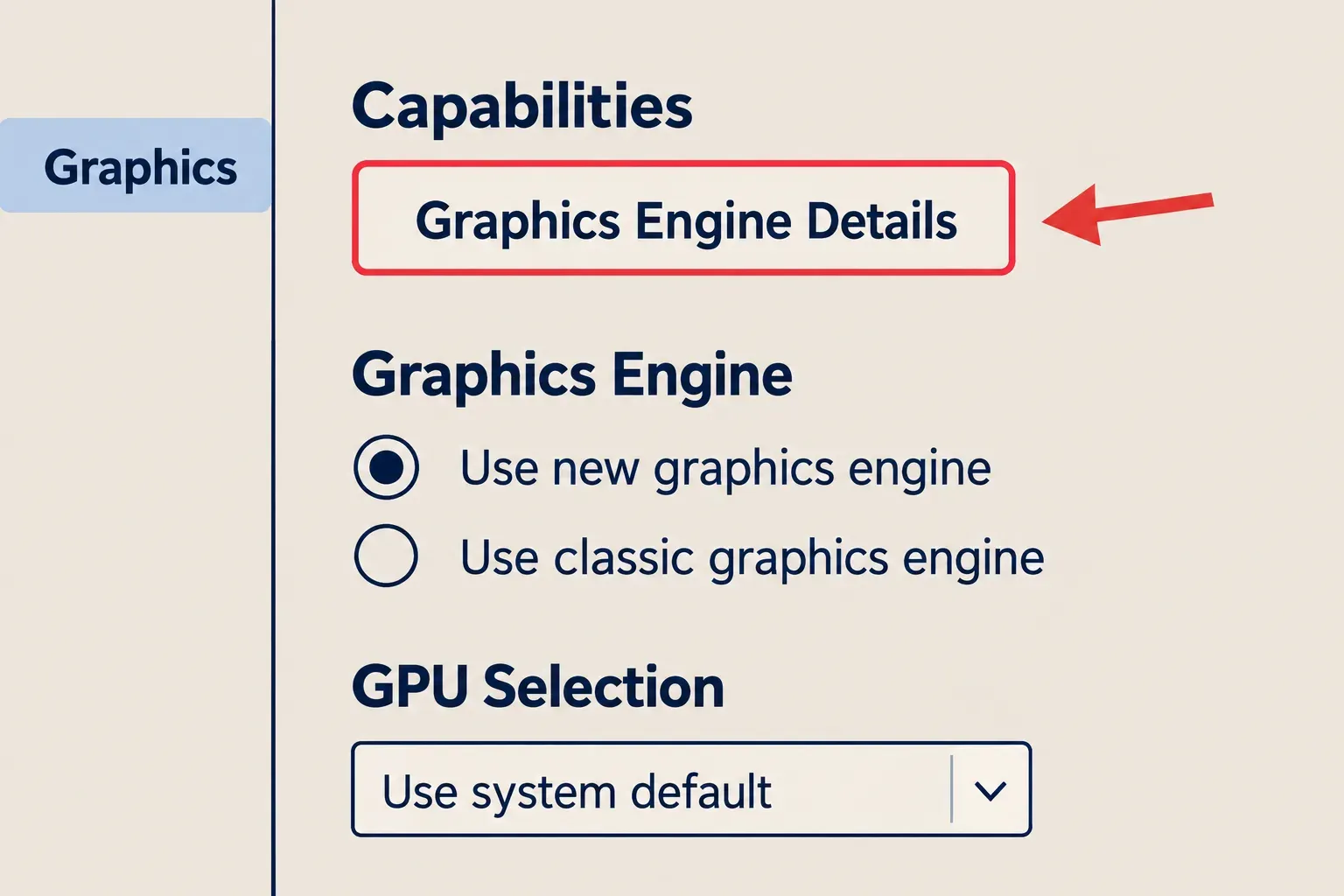
Click Graphics Engine Details in Capabilities. The Graphics preferences reference describes the information in that dialog and the GPU Selection control for machines with more than one GPU. Check the selected device before assuming that SketchUp is using the card you compared with the requirements.
If the computer can't use the newer engine, SketchUp defaults to the classic engine. That fallback still has its OpenGL requirement. It doesn't remove the supported operating-system or processor conditions. On older Mac releases, the new engine also excludes the Intel HD Graphics 5000 and 6000, Iris Graphics, Iris Graphics 6100 and Iris Pro Graphics named on the requirements page.
For freezing, artifacts or unexpectedly slow display, Trimble recommends updating the graphics driver. On a laptop, use its manufacturer's driver; on a desktop, use the GPU manufacturer's driver. Mac graphics-driver updates arrive with macOS updates. Save the model before changing drivers or restarting.
Display limits and unsupported configurations
The display compatibility guidance limits a supported multi-display setup to two displays, with no more than one 4K display, matched resolutions and no 5K display. It recommends 100% scaling and says scaling above 150% isn't supported. After changing display scaling, restart SketchUp so its icons resize correctly.
The same guidance lists 32-bit systems, ARM64 Windows setups, VMware, Parallels, Remote Desktop Connection and external GPUs as unsupported. There is no Linux desktop version. Treat these as support limits when deciding whether to keep a machine or change its configuration.
Virtualization has a separate licensing distinction. Trimble allows supported SketchUp versions in virtual environments under a product-specific exception, while offering no technical support or recommended virtualization specifications. Its guidance also warns that graphics performance differs from a native installation. Permission to use a virtual environment doesn't make VMware or Parallels a supported hardware choice.
SketchUp for Web and iPad have separate requirements
The SketchUp for Web requirements publish both minimum and recommended specifications. Check the browser route against this table instead of applying the desktop list to it.
| Web requirement | Minimum | Recommended |
|---|---|---|
| Processor | 2.1+ GHz Intel | 2.8+ GHz Intel |
| RAM | 4GB | 8GB or more |
| Free disk space | 700MB | At least 1GB |
| Graphics | Intel HD integrated graphics with at least 512MB video memory | A discrete card; Trimble gives the AMD Radeon R9 M37X 2048MB as an example |
Trimble recommends current Chrome, Firefox or Microsoft Edge. Safari can run the web app, but isn't its recommended browser. The new web graphics engine requires browser WebGPU support; when that support is absent, its Graphics settings tab doesn't appear. PBR materials, Ambient Occlusion and Environments in that engine require a subscription. The free browser modeler has its own plan limits.
SketchUp for iPad requires iPadOS 18 or later. Apple Pencil is optional: the app supports touch, a supported keyboard and trackpad, or a Bluetooth three-button scroll-wheel mouse. Scan-to-Design additionally requires a LiDAR-equipped iPad. Match that feature to the actual iPad model before choosing it.
Download the right release and sign in
Use Trimble's download instructions to select the current Windows or Mac installer, or follow their older-version route for a supported legacy release. On Windows, the online installer can supply the required Visual C++ Redistributable for Visual Studio 2015 and .NET Framework 4.6.2 files. Keep the application on the computer's main local drive, as the installation instructions recommend.
Internet access is needed to install and authorize the subscription, but desktop modeling doesn't need a persistent connection. The offline-use policy allows work after a successful login within the previous 28 days; online services such as 3D Warehouse still need a connection. If the old computer is no longer usable, follow the separate activation-reset instructions before moving SketchUp to its replacement.